Categories
ICT Math Education MathEd Research Tools

BSRLM conference part 2 Alnuset

The third session I attended was more a discussion and critique session, led by Monaghan and Mason, on the topic of ‘cultural affordances’. The basis was the work of Chiappini, who -in the ReMath project- used the software program Alnuset (see here to download it) to look at (its) affordances. Monaghan described the work (a paper on the topic, there will be a publication in 2013, was available) and then asked some questions. Chiappini distinguishes three layers of affordances: perceived, ergonomic and cultural. Engestroms cycle of expansive learning is used, as I understood it, to use activities as drivers for transformation of ergonomic affordances into cultural affordances. Monaghan then asked some critical questions, under which whether the theory of Engestrom really was necessary, wouldn’t for example Radfords work on gestures be more appropriate? Another comment pondered whether the steps for expansive learning were prescriptive or descriptive. I think the former: as the author has made the software with certain design elements in mind it is pretty obvious that they have a preconceived notion of how student learning should take place.  It was pretty hard to discuss these more philosophical issues in detail. I’m not really sure if I even understand the work. Although this could be solely because I haven’t read enough about it, I also feel a bit as if ‘difficult words’ are used to state the obvious. I could only describe what I was thinking off. The article that I took home afterwards gave some more pointers. To get a grasp of this I downloaded the software, that reminded me a bit of the Freudenthal Institute’s ‘Geometrische algebra’ applets, and tried out the software. I liked the idea behind the software. In this example I’ve made three expressions, and I can manipulate x. The other two expressions change with x. Some comments:
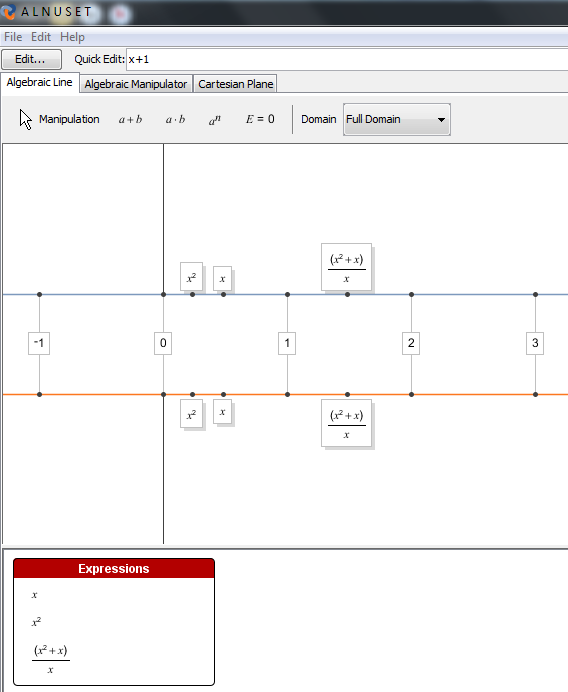
  1. I like the way expressions are made and the look and feel, as well as the way dragging changes the expression. Also ‘dividing by zero’ causes expressions to disappear. However, why does x=0 disappear as well when I drag x to 0? (see figure)
  2. I don’t see how the drawback of every tool that allows ‘dragging’, namely just pointless dragging, in this case just to line up the different expressions, is solved. Maybe this isn’t the main goal of the software.
  3. I think that the number line should be used in conjunction with tables and graphs, thus forming a triad expression-table-graphs. The addition of things like an algebraic manipulator and a Cartesian plane seems to indicate that the authors also like more than one representation.
  4. It has far too limited scope for algebra. The 30 day trial is handy here, as in my opinion the software doesn’t do enough to warrant the price.
Categories
ICT Math Education MathEd Tools

Geogebra on the Web

Of course, most of us will already know Geogebra. The latest incarnation, called GeogebraWeb, is made in HTML5 and is a great next step towards an application -as Geogebra initially is java software- towards software for various platforms, including tablets. In a kickstarter project Geogebra is now asking funds for making an iPad app. I’m wondering why. Sure, I can think of some reasons, including the great demand for it and maybe even some native features can be used more efficiently than in HTML5. But it isn’t open. Also the fact that other tablet users will just have to wait, even though it is jokingly stated that it will eventually become multi-platdorm for other tablets too, seems strange if the philosophy behind geogebra is open-ness. Then why not stick with HTML5!!!??? Or just make sure that both android and ipad apps are released on the same day!!!!???

And there are more questions. One of the novel HTML5 features is a Google Drive connection (screenshots above and below).

This is the file it created

The advantage of providing open tools is that this perhaps could be other online drives as well. How can we be sure that different platforms will communicate with different cloud functions, knowing that, for example, Apple and Google do not always see eye to eye. And that would be a shame. Inter-operability should work for all environments.


NOTE: In an earlier post I already mentioned that storing student tasks online would be beneficial, describing the DME (DWO in Dutch).

Categories
ICT Math Education MathEd Tools

Dabbling in Sketchometry

Sketchometry

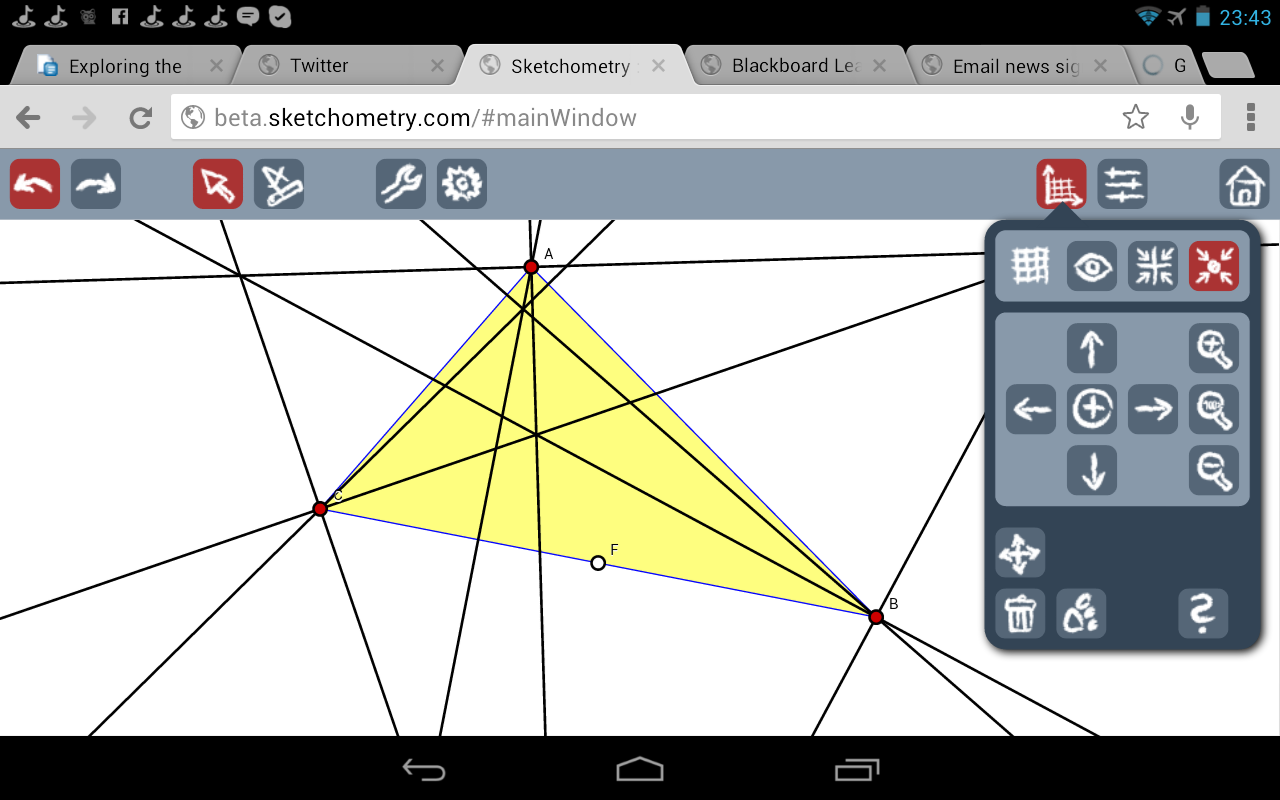
After being alerted by a colleague, today I dabbled a bit in Sketchometry. I like it. It can recognize finger gestures, especially useful on tablets, for geometric constructions. There is a calculus function but frankly, this adds nothing to the program. Its strength lies in geometry, and the fact that it works on almost everything, as it is web-based. Furthermore it connects to Dropbox and other cloud-systems. It took a while to get used to the cluttered user interface. Reading this file with available gestures really helped a lot (although there is a mistake, where naturally making a circle should give a circle not a straight line). The number of options and features is not very large.

Midpoint gesture

The quintessential construction is the Euler line. I tried to make this on a Nexus. The screen isn’t big enough, really, for the best experience. Also, the use of my (fat) fingers did not work all that well. Certain gestures were hard to carry out, especially if they involved selecting certain points, like drawing perpendiculars or designating intersections. But even if this was the case, it was great to be able to use gestures, anyway. After around 200 gestures (I had to undo many of them because it recognized the wrong ones) I had something that resembled Euler’s line. I loved the gestures for bisectors and midpoints, with the latter being a one from point to point and a loop in the middle. With quite a few objects the application did seem to slow down considerably, and some icons seemed to disappear.

This could be the case because it could be considered a beta version. What bodes less well for the future is the fact that the most recent post is from Jun 23rd (2012). I hope this does not mean it is the end-product of ‘yet another project’, and now that the project is finished no more updates are given. One of the strengths of for example Geogebra is that it managed to create a large userbase and community working on the software, but also creating content.

Of course, the application would have been even better if it would provide character and formula recognition like in windows 7, Snote by samsung, Inftyreader or visionobjects….. 🙂 But overall it is a great concept!

Dabbling in Sketchometry
Categories
ICT Math Education MathEd Tools

Teaching kids real math with computers: a comment on Wolfram

Only recently I read this blogpost on a TED talk by Conrad Wolfram.


Although I agree with most in the blogpost, I think Wolfram paints a caricature of mathematics.  Let me make some comments.

I think Wolfram generalizes too much with regard to different countries. I don’t really know that much about the US situation, but I have the impression that procedural fluency and computation are valued much more over there than in Asia or Europe. Something that Michael Pershan also points out in this excellent video. In the Netherlands conceptual understanding is deemed more important, as is the connection to the real world. In this respect Wolfram exaggerates the percentage involved in computation (80% computation by hand).

This brings me to another point. Wolfram is highly involved with some of the developments of Mathematica software (which his brother Stephen created). He even shows it off in his talk. Undoubtedly, Mathematica and Wolfram Alpha are great pieces of software, that can perform awesome calculations. This, however, makes clear that that using a tool to get rid of computation is what is central in his talk, not the other three points.

Mind you, these three steps are very important, and remind me of Polya on problem solving. I just don’t agree with Wolframs fixation on discarding the third point. Wolfram does see a place for teaching ‘computation’ and says we “only [should] do hand calculations where it makes sense”. He also talks about what ‘the basics’ are, and makes a comparison with technology and engineering in cars. Here it would have helped if Wolfram would have acknowledged the difference between blackbox/whitebox systems (see Buchberger, http://dl.acm.org/citation.cfm?id=1095228):

In the “white box” phase, algorithms must be studied thoroughly, i.e. the underlying theory must be treated completely and algorithmic examples must be studied in all details. In the black box phase, problem instances from the area can be solved by using symbolic computation software systems. This principle can be applied recursively.

The whole section where Wolfram addresses criticims of his approach sounds far too defensive. He does not agree with the fact that mathematics is dumbed down, and using computers is just ‘pushing the buttons’. This has to do with the traditional discussion between ‘Use to learn’ and ‘Learn to use’. Again, I think Wolframs whole argumentation is a bit shaky: first he attacks learning algorithms with pen-and-paper , but then he does see a fantastic use regarding understanding processes and procedures. This is where Wolfram applauds programming as a subject. Then he shows many applications with sliders and claims: Feel the math! He shows an application for increasing the sides of a polygon and claims this introduces  the “early step into limits”. By using a slider? I’m thinking of an applet I used in my math class teaching the concept of slopes and differentation. I thought it worked pretty well…until I found out students were just dragging the two points together. So what is actually learned?

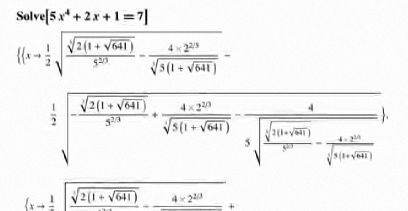
As another example, there is a part where Wolfram subtitutes the power 2 with a 4, uses Mathematica, and then says ‘same principles are applied’.

If he means that the same piece of software was used, then this is the same principle. If his claim is that the mathematics behind solving an higher order equation uses the same principles as solving a quadratic equation, then I wonder if this really is the message you want to convey to students. Of course the outside world has much more difficult equations, and that brings me to a final point made, concerning a ‘means to an end’. Wolfram does not define what the actual goal of mathematics is. If it is ‘getting the result’ then one could argue that using a computer over doing it by hand makes sense. However, if -and that was Wolframs claim- the goal is ‘teaching’ then I think mathematics brings more than just some results. Wolfram seems to see mathematics as a supporting science for other subjects, and does not seem to acknowledge a broader view of mathematics as a subject aimed at problem. Which is strange regarding Wolframs initial words on really teaching mathematics.

By no means I’m claiming this is an overly extensive critique of Wolfram’s talk, just a few points that -to me- warrant the conclusion that Wolfram paints too much of a caricature of maths education. I’d rather keep it with the conclusion of the blogpost it started with (translation): “Put aside those textbook with tasks, en tell students what has inspired you to learn your subject. Tell stories. Or get people into the classroom to show inspring examples. Let students look at problems in a different way, and see how they can address these problems with the help of mathematics.”. Amen.

Categories
ICT Math Education MathEd Tools

Storing student work and checking geometry tasks

One of the –in my opinion- most impressive features I have seen in mathematics software is the recent fusion of the Freudenthal Institutes (FI) DME (Digital Mathematical Environment), good content and the ability to plug in components like Geogebra. Of course, it also is software that I know well, because my thesis (www.algebrametinzicht.nl) also used the DME.

For the DPICT project of the FI several lesson series were also translated to English. One of them concerned Geometry. Articles and papers of the project will appear, but I think the material warrants an impression in screenshots.

Logging in as a student:

Accessing the Geometry module:

The geometry module consists of several activities:

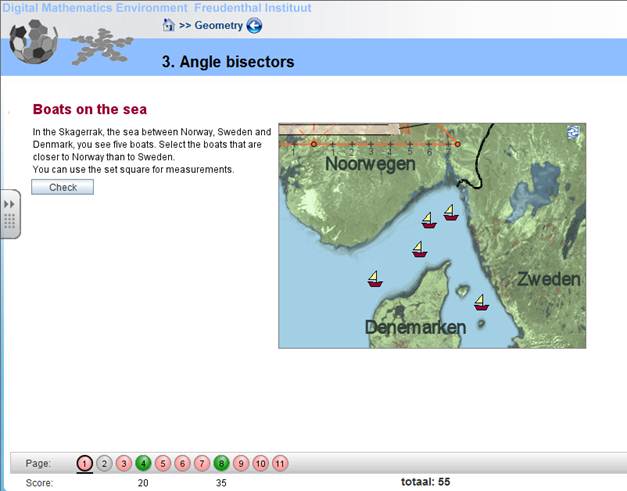
One of the activities starts with a task not uncommon in Dutch textbooks:

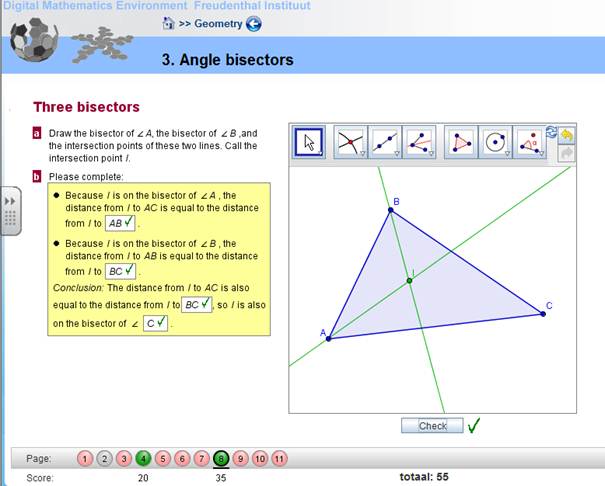
Geometric construction on the right side can be checked. There are open textboxes (which can’t be checked on correct or incorrect, but can be accessed by the teacher). Note that the [c] task, a drop and drag task, was answered incorrectly.

After correcting:

Another task where both constructions and answers are checked:

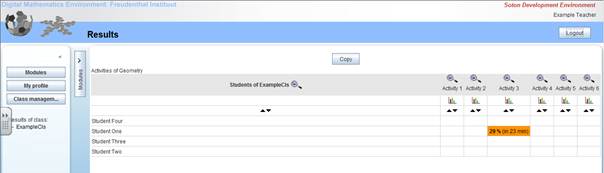
Teachers can see how students performed:

Teacher looks at the task shown earlier:

Categories
ICT Math Education MathEd Tools

Rapid Miner datamining

I recently got into a discussion about datamining. I actually think we have just started to scratch the surface of big data, Learning Analytics and Educational Datamining. As, for example, the Digitale Mathematical Environment (DME, see here), can produce large logfiles of all students’ actions it would be interesting to see if we can find patterns with machine learning techniques. One thing I would like to find out is whether a collaboration with a Computer Science department is possible. I was just dabbling in Rapid Miner, which works and looks great. Using Paren, Automatic System Construction, I trained a sample set of information on Irises. For the future I will see if I can use Rapid Miner. Another option is Weka.

Categories
Math Education MathEd Tools

Algebrakit-toets

A while back I stumbled on Algebrakit-toets. I never got round to archiving and/or describing it, so here gooes. Algebrakit-toets provides an semi-automatic environment for creating tests and answer-sheets. It can be started here (Dutch, programmer Martijn Slob).

In a wizard-like environment it can:

  • Make tasks for various levels and years.
  • Every student gets a differently randomized test.
  • Every test can be accompanied by an answer sheet

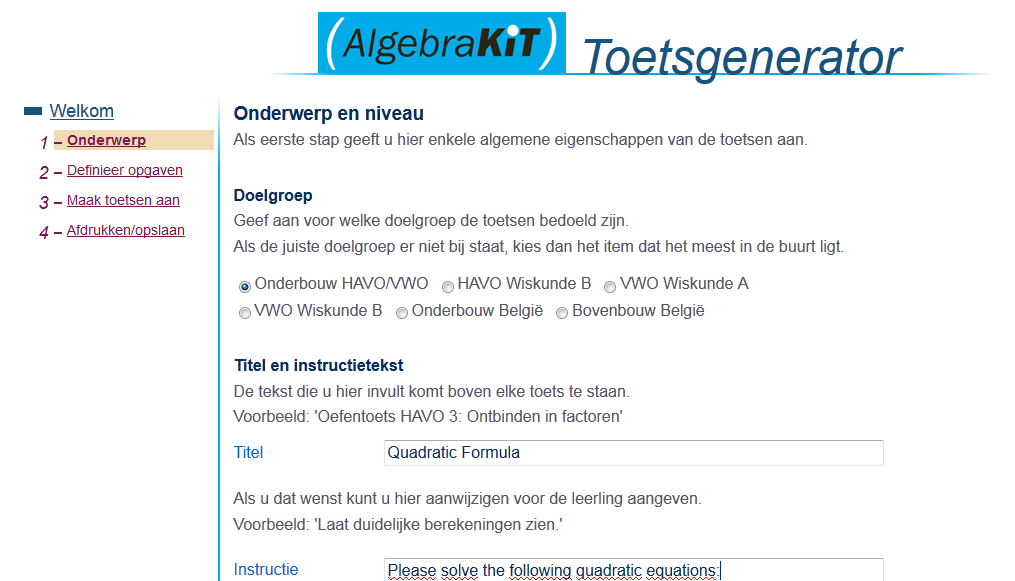
Step 1: general information: first input general information on the test

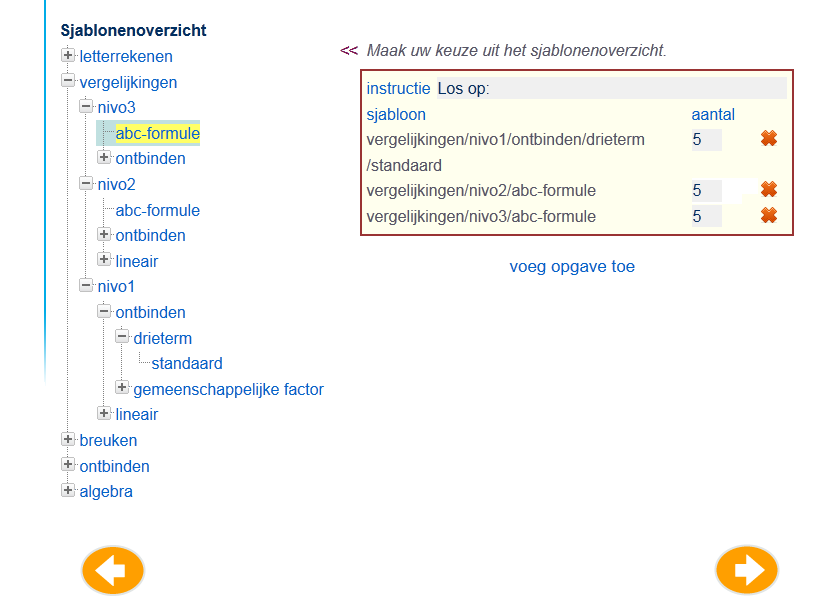
Step 2: choose the level, subject and number of tasks. Note that changing the order of questions seems a bit hard to do.

Step 3: now indicate how many different tests you need

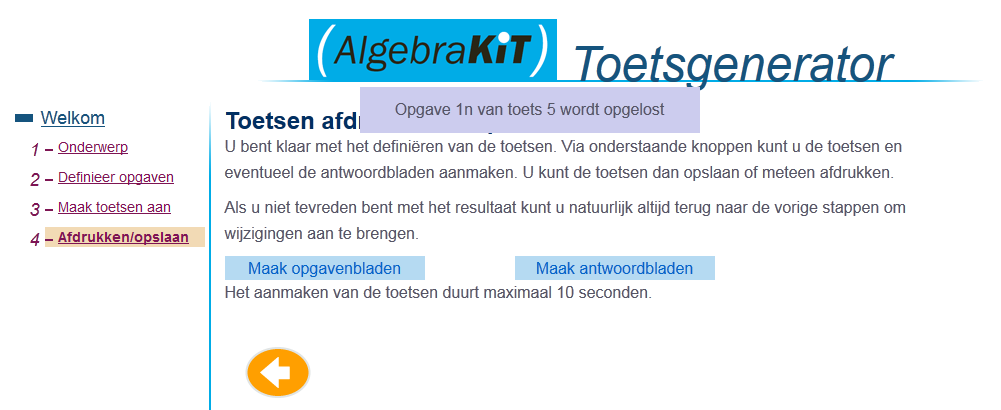
Step 4: clicking “Genereer toetsen” makes the appropriate tests. Clicking “Bereken de antwoorden” generates the answers. This can take a while. Clicking the button shows intermediate steps. You can also choose just to continue.

Step 5: here, finally you can download the task and answer sheets. Nte: for the latter to work you will have to “Bereken de antwoorden”.

Click AlgebraKIT-toets for an example task sheets.
Click AlgebraKIT-toets-antw for the accompanying answer sheets.